

Product Rating: 4.9/5
TL;DR:
Elementor is considered one of the best page builders to use. As an end user of the software myself, I’ve been able to create a fully customized and professional website. By getting Elementor Pro, you’ll even be able to customize headers and footers and get access to many more widgets and templates to effortlessly create. Are you ready to create a site that stands out from the crowd?
Quick answer (last checked: November 17, 2026)
Elementor Pro’s regular yearly prices are $84 for Advanced Solo (1 site) and $108 for Advanced (3 sites), with Expert at about $204 for 25 sites (not rechecked). Essential (1 site) was $60 per year during Elementor’s November 2026 sale, and I could not confirm its regular price. Discounts like Black Friday sales come and go, so what you pay may be lower for a while. The Personal, Plus and Expert plans at $49, $99 and $199 in the older sections below are gone.
How I checked: I checked Elementor’s pricing page in a browser on November 17, 2026, while its Black Friday sale was running (annual plans only, no monthly option). Because sales end, I use the regular and renewal prices as the main figures. I did not read the Expert and One Agency prices, so those come from independent 2026 reviews. Please confirm the price on Elementor’s page before you buy. The free version of Elementor is still available.
Elementor Pro Pricing in 2026
| Essential | Advanced Solo | Advanced | Expert | |
|---|---|---|---|---|
| Regular / renewal price per year | Not confirmed ($60 during the Nov 2026 sale) | $84 | $108 | $204 (from reviews, not rechecked) |
| Sites | 1 | 1 | 3 | 25 |
| Theme Builder | Yes | Yes | Yes | Yes |
| Popup Builder | No | Yes | Yes | Yes |
| Custom code and CSS | No | Yes | Yes | Yes |
| eCommerce features | No | Yes | Yes | Yes |
| Cloud templates | 10 | 20 | 30 | 5,000 |
Check what it costs per sale with my free Affiliate Earnings & Break-Even Planner.
Elementor Old Pricing Table (Personal, Plus, Expert)
Pricing note (November 2026): Elementor no longer sells the Personal, Plus and Expert plans below. This is how pricing looked when I wrote this post, so use the current table above.
Let’s take a look at the pricing for Elementor Pro. These were the three plans when I wrote this post:
- Personal Plan – $49 per year for 1 site
- Plus Plan – $99 per year for 3 sites
- Expert Plan $199 per year for 1000 sites

| Personal Plan | Plus Plan | Expert Plan | |
|---|---|---|---|
| Pricing: | $49/year | $99/year | $199/year |
| # Of Sites: | 1 | 3 | 1000 |
Elementor Overview: What is it?
Elementor is a well-built WordPress page builder used to fully customize the look and feel of your blog or website.
I’ve been using Elementor to design the blog you’re on right now. It’s allowed me to create my own professional looking design that’s truly without limits.
The first impression of a website visitor is likely to be the design of your website. If you haven’t taken the time to design a unique site, you simply won’t stand out.
When you get Elementor, you get access to creating custom post templates to easily create new blog posts or pages with ease. Plus, you won’t need anything extra to create pop-ups. Simply get Elementor Pro and build all the pop-ups and forms directly with the page builder.
Elementor Pro Pricing Exclusive Features
Elementor has a ton of amazing features that make it one of the best page builders around. I’ll focus on the key features that I use most often that you’ll likely use a lot as well.
Let’s take a look now at the key features available only with Elementor Pro.
1) Pro Widgets Available (Even More With Essential Addons)
With Elementor you get access to over 90 widgets you can use out of the box to design you website. When you get Elementor Pro, you’ll have access to tons of additional widgets which you can see below.
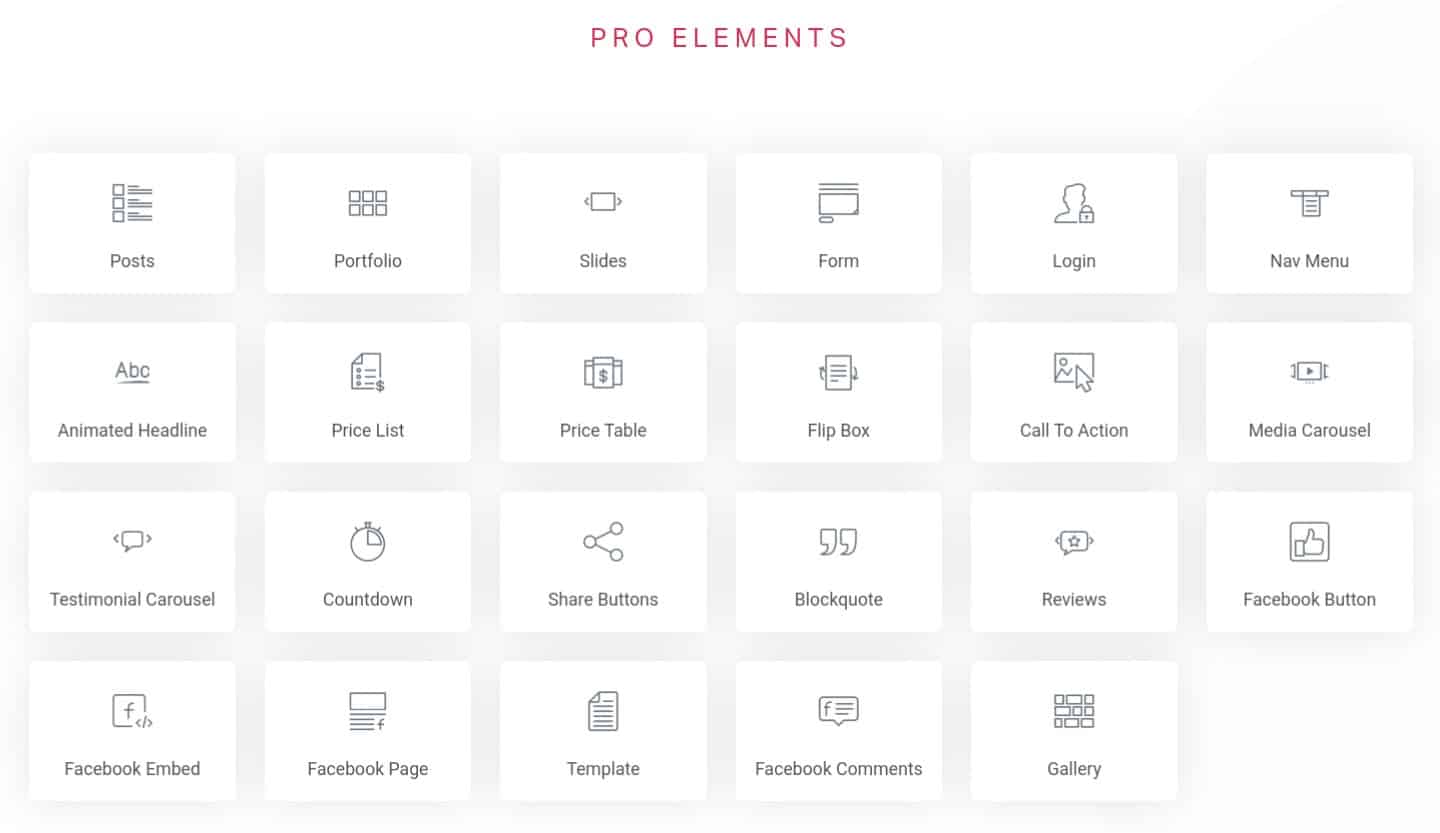
The Elementor Pro elements include:
- Posts
- Portfolio
- Slides
- Form
- Login
- Nav Menu
- Advanced headline
- Price list
- Price table
- Flip box
- Call to action
- Media carousel
- Testimonial carousel
- Countdown
- Share buttons
- Block quote
- Reviews
- Facebook button
- Facebook embed
- Template
- Facebook comments
- Facebook page
- Gallery
On top of all the widgets you can get with Elementor Pro are the Essential Add-ons for additional functionality.
With the Essential Add-ons you get an additional 60+ widgets. My favorite ones to use are the dynamic post grid and dynamic gallery. This allows for a new post to appear automatically whenever it’s published.

The post gallery above automatically updates on my site with the featured image whenever I publish a new post. This is extremely useful and the look and feel of the gallery can be optimized to your liking.
2) Theme Builder (Create Post Templates & Global Widgets)
The Theme Builder is only available with the Elementor Pro version and is by far the most useful for website design.

It allows you to create post templates you can use for every single post or page you create. This has saved me a tremendous amount of time and allows me to get to work and start writing as quick as possible.

Global widgets are another thing that I use constantly that you may not immediately recognize as being useful. Some of the things I use them for are, sidebar widgets, affiliate disclaimers, and author box.
You can even set certain templates to display only for specific posts or categories. See below for how to do this. You can also check out WPCrafter or the WPCrafter YouTube Channel for some great Elementor Pro tutorials.

3) Built-In Popups & Forms
One of the really useful things you get if you decide to get the Pro version of Elementor is popups.
Normally, you’d need an additional plugin and likely have to pay an additional monthly fee simply to add popups and forms on your site.

With Elementor Pro, you have the ability to create customizable popup forms that can even connect with your favorite email autoresponder.
This means that you’ll easily be able to follow-up with your website visitors and save a ton of money in the process. However, I actually use Thrive Leads on my site for popups primarily because it allows for split-testing and shows in-depth statistics.
So, if you want a more advanced popup and form plugin in addition to Elementor Pro then I’d recommend going with Thrive Leads.
You can check out my full in-depth Thrive Leads review for more.
Should You Upgrade To The Pro Version?
This is the all important question: Should you upgrade to Elementor Pro?
Well, I currently have it on my site and honestly don’t know what I’d do without some of the extra features it provides.
Here’s just a few things you get extra with Elementor Pro:
- Access to use an extra 50+ widgets
- Theme Builder to create custom templates
- Custom Headers and Footers with display conditions
- Customized Popups for your site and can integrate with your favorite autoresponder
- Access to tons of additional Pro site templates to build off of
- 24/7 Priority Support
- All the latest Elementor Pro updates
Frequently Asked Questions
Do you need a child theme with Elementor?
Elementor comes with the Hello Elementor theme for free! It’s the same theme that I started building my blog on when I started out using Elementor and it worked great. Now, I’ve upgraded to the Astra Pro theme for a few additional functionalities.
Does Elementor Page Builder slow down your site?
Surprisingly, Elementor is a lightweight page builder that doesn’t dramatically affect the page load speed of your site. Out of all the page builders out there, Elementor is one of the fastest.
Can you make global elements and templates with Elementor Pro?
Yes! If you get Elementor Pro, you’ll be able to create global templates you can use for every post or specific places on your site.
What’s the cheapest pricing plan for Elementor Pro?
The base plan for Elementor is actually free. However, you’ll be missing out on a lot of key features and won’t get any pro updates, which is why I recommend going with Elementor Pro. The cheapest Elementor Pro plan today is Essential, which was $60 per year for 1 site during Elementor’s November 2026 sale (I could not confirm its regular price; it was $49 per year when I wrote this).
More Elementor Pricing Questions (Updated November 2026)
How much does Elementor Pro cost in 2026?
At regular prices, Advanced Solo is $84 per year for 1 site, Advanced $108 for 3 sites and Expert about $204 for 25 sites. Essential was $60 per year for 1 site during the November 2026 sale (regular price not confirmed). Elementor also sells One bundles with AI credits.
Does the Essential plan include the popup builder?
No. Elementor’s pricing page lists no popup builder, no custom code and no eCommerce features on Essential. They start on Advanced Solo.
Is Elementor free?
The core Elementor page builder is free. Elementor Pro adds the Theme Builder, popups and more.
Elementor Pricing: Closing Thoughts
Out of all the page builders out there, I chose to build my site with Elementor Pro.
It gives you the flexibility and freedom to create a website that looks professional and will undeniably make a great first impression. There’s constantly new updates and the builder is being improved regularly.
It’s one of the few page builders that doesn’t drag down the page load time as well.
All around, Elementor has my vote. I will without a doubt be building my next site with Elementor Pro. What about you? Head below to get started with Elementor Pro.
Suggested Posts For You…
- Elementor Review: Best WordPress Page Builder [Updated]
- ClickFunnels Review: Is it worth the money? [Free Trial]
- ActiveCampaign Review: What does it do? [FREE Trial + Bonuses]
- Affiliate Earnings & Break-Even Planner
- UTM Builder & GA4 Channel Checker
Affiliate Disclaimer
I hope you enjoyed this post and got some value from this Elementor Pricing Post. This post contains affiliate links. This means I may make a small commission if you make a purchase.


It would be great if you included a distinction between expert and the other licenses that is, what can you do and not do with those 1000 websites? Build them for clients? That seems contrary to the T&Cs of Elementor on quick reading. I am a single license user of Pro and wonder if I become successful at do this as part of a business should I upgrade to expert or just ensure that the client has a license appropriate for their needs? I hope that makes sense.
You have to purchase a larger package in order to use Elementor on more than one domain. If you’re working with clients, then I’d suggest having them purchase the software using your affiliate link. Either that or you’ll need to purchase the more expensive plan.