
This review takes a deep dive into why ClickMagick is such a powerful tool that can help you in explode the profits of your business.
I know it’s hard to see initially how a click tracking software might be useful to your business at all. So, we’ll take a look at my personal favorite ClickMagick features that I use to track affiliate links.
Stick with me here because in this I’m going to pull back the curtain on ClickMagick.
I’ll share behind the scenes and uncover its strengths and weaknesses which you’ll need to know before making a purchase.
No matter what, you need to be using click tracking for your business. It doesn’t matter if you primarily do affiliate marketing or freelance digital marketing.
ClickMagick Review
Product Rating: 4.9/5 Stars
TLDR:
ClickMagick is undoubtedly the best out there when it comes to click tracking. It opens up a world of opportunity for you to easily track clicks without the headache or frustration. I love seeing how many people have clicked my links all over the web all in one place. I know you will too.
Plus, there’s a HUGE stash of bonuses waiting for you at the end!

Here’s a breakdown of what I’ll be covering:
If you’re ready to get started with click tracking, then skip to the end of this review and take me up on my ClickMagick Bonus Package.
ClickMagick Review: What is ClickMagick?
ClickMagick is a click tracking software that helps you manage and track your links across the internet. It’s the most trusted click tracker out there used by thousands of online entrepreneurs every single day.
One of the main goals of using ClickMagick is that you can accurately and effectively track conversions.
Whether it be the optin rate of a landing page or the purchase of a product or upsell towards the end of a funnel, ClickMagick allows you to compile these stats for each link you create.
Everything that you can do with ClickMagick all serves one unique purpose: optimizing your website or funnel to increase sales.
Once you dive into using ClickMagick, you’ll wonder how you ever got by without it.
ClickMagick is one of those must-have tools that’s essential to building a long-term sustainable business online that’s both profitable and impactful.
David Sandy Tweet
ClickMagick Review: What Is Click Tracking?
Click tracking (a.k.a. link tracking) in its most basic form is tracking when a user clicks on one of your links on the internet and is in turn recorded as a click for that specific link.
As we start to take a closer look at what all is involved with click tracking, you’ll find that there’s some pretty powerful things you can do beyond just tracking a click for the sake of it.
The most common use by far would be to track the optin rate on a form of a landing page. In this case, ClickMagick would record each person who submits their info and makes it to the “Thank You” page as someone who took action and is now a lead.
Things start to get more interesting as you begin to track how many people visit each of the steps in your funnel, who purchased the initial product, and who went on to purchase an upsell.
Now, having the statistics is great and all but how does this help you get more cash in your pocket each month? Well, that leads me to the next question.
ClickMagick Review: Why Is Click Tracking Important?
On the surface, you may feel like click tracking doesn’t really serve that much of a purpose in terms of increasing your revenue each month for your business.
However, the opposite is true.
ClickMagick has the potential to drastically increase conversions of sales. This means more revenue and cash for your online business.
When you think about it, once you’ve got the statistics on who’s clicking what, where, and how many times then there’s only one thing left to do: optimize.
Optimizing your site or funnel doesn’t have to be complicated.
In fact, you’ll be better off changing one specific variable at a time, sending some traffic, and assessing the data to either keep the change made or try something new.
This is the true essence of optimization:
- Collect Data
- Review The Results
- Implement The Change
- Repeat
Always remember, the more you focus on optimizing everything, the more sales you’re likely to get. In turn, your business will inevitably grow over time.
Who Is ClickMagick For?
If you’re doing any sort of online business, then ClickMagick is for you.
It doesn’t matter whether you’re running paid ads and tracking conversions on those ads or if you’ve simply got a blog or YouTube channel like me.
ClickMagick has the power to affect your bottom line dramatically.
I can’t stress enough the importance of click tracking and the inherent value it can provide to your online business.
I remember when I got my first sale online…
I didn’t use tracking. So, I ended up with a sale but had no idea where it came from.
The end result? I had no idea what worked to actually get me that first sale, so I couldn’t focus on my attention on scaling it.
This is just one of the many reasons why using click tracking and ClickMagick specifically is not only useful but necessary.
ClickMagick Features: The Complete Guide
Let’s take a look now at some of the main features you can expect to have once you sign up for the 14 day free trial of ClickMagick.
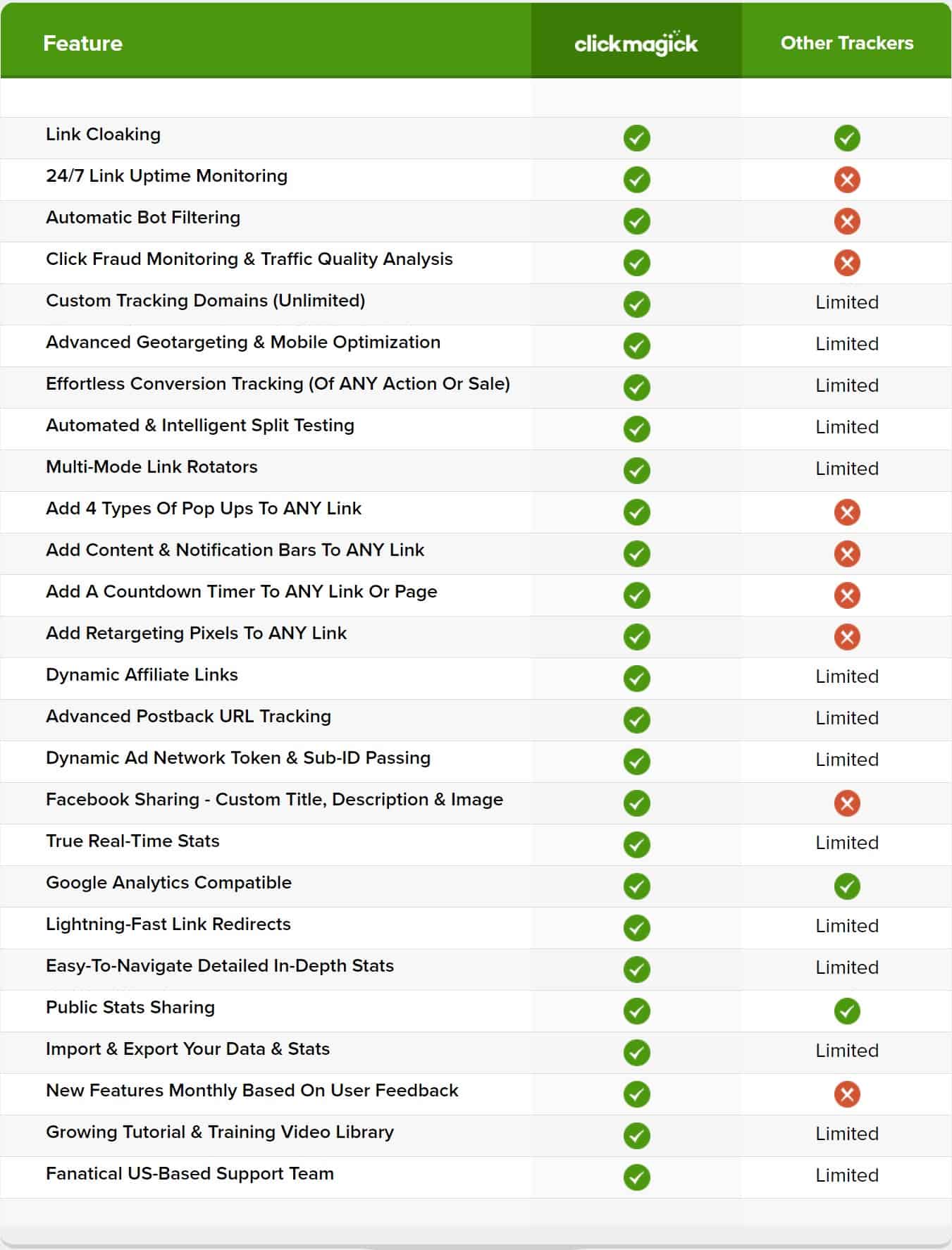
ClickMagick Dashboard Statistics
Taking a look inside my ClickMagick account, you’ll see that you can view the overall stats for specific date ranges you input.
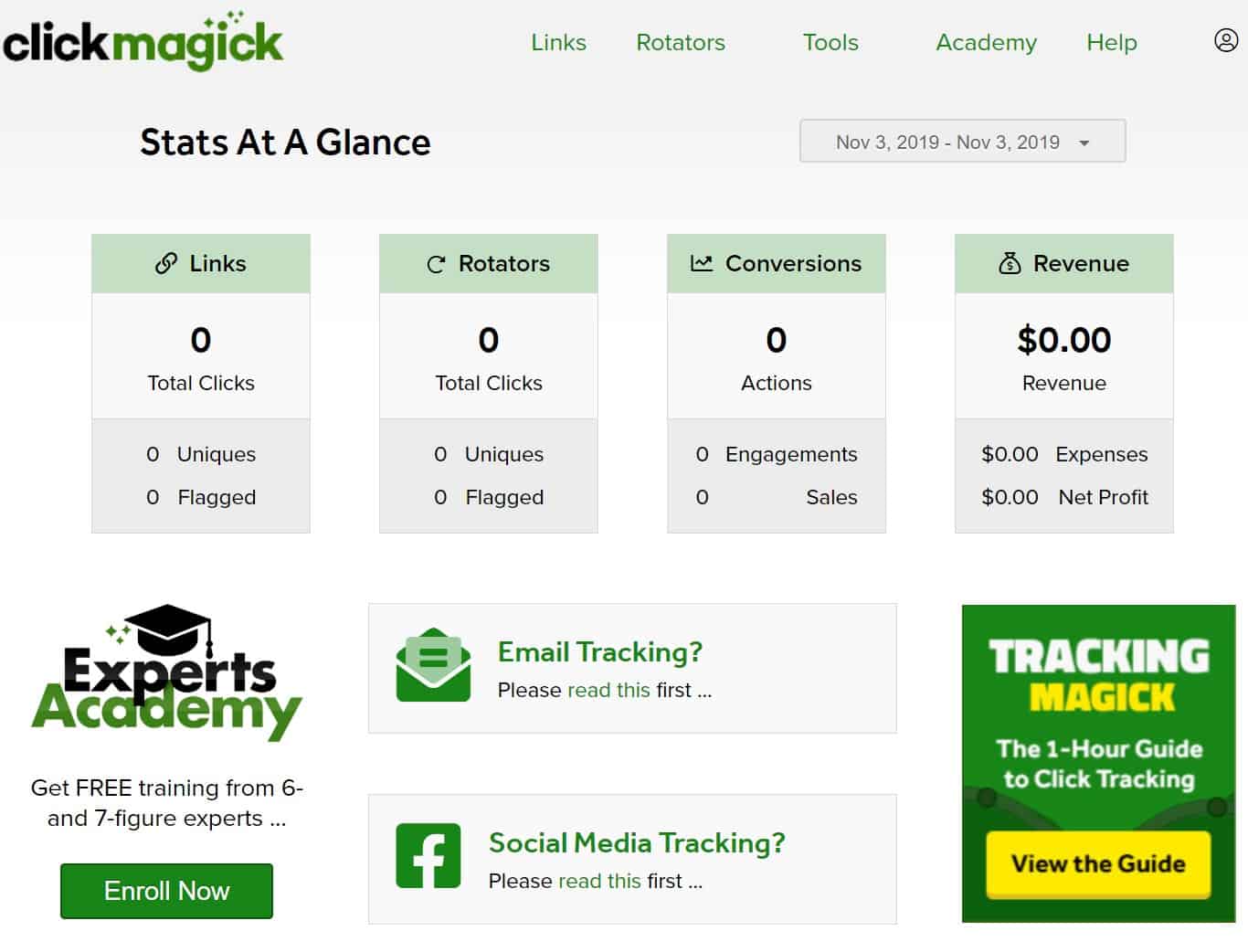
I actually like this dashboard quite a bit.
If you’ve got all your links out there on the internet in various places like most people, it’s nice to have a comprehensive dashboard that outlines everything.
Plus, you get the feeling that people are actually taking interest in your content and what you have to say. 🙂
24/7 Link Uptime Monitoring
There’s nothing more depressing and costly than having a broken link.
If you’re running ads to a link that isn’t working or sending people to the wrong place, then ClickMagick can save the day.
With 24/7 link uptime monitoring, ClickMagick monitors all of your links and notifies you typically by email right away whenever a link goes down or doesn’t seem to be tracking properly.
I’ve gotten a few emails myself in relation to this and can say it has definitely saved me money, so I didn’t send traffic to something that had no chance of converting.
Automatic Traffic Quality Analysis
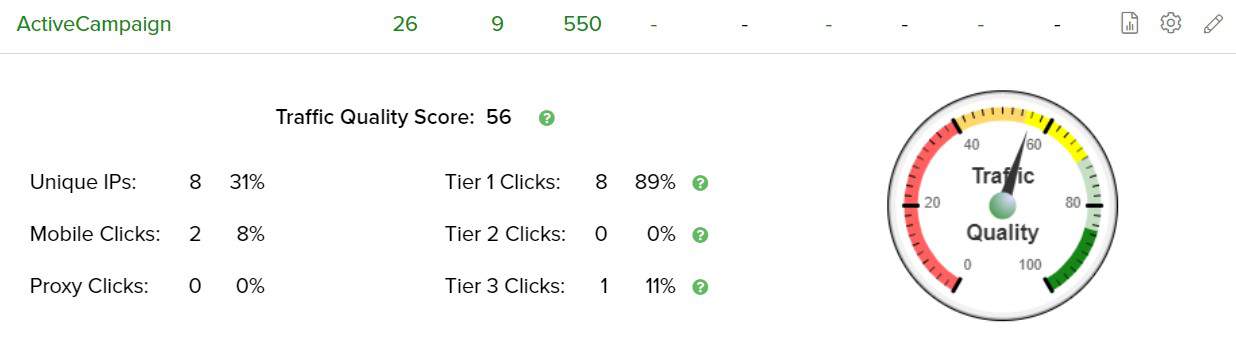
ClickMagick has a cool little traffic quality score for every link you create as well.
You can view what Tier of countries are viewing your clicks (Tier 1, 2, or 3) and also the unique IPs.
It’s a handy little statistic that I typically look at if I’m running solo ads with Udimi or Traffic4Me.
Automatic Bot Filtering
By having automatic bot filtering, you can be sure you’re getting true unique clicks.
One of the worst things that could happen is if you’re getting spam or bot clicks on your links and not even know it.
ClickMagick helps you out in this department by filtering out unwanted bot clicks.
Facebook And Google Analytics Compatible
If you’re running Facebook ads or Google ads on a regular basis or plan to in the future, you’ll be pleased to know that ClickMagick is 100% compatible.
It also works great in terms of integrating Google Analytics for getting extra data and statistics. Plus, you can easily create custom audiences and retargeting campaigns.
Dynamic Affiliate Links

Probably my favorite feature out of all of them would have to be dynamic affiliate links.
With dynamic affiliate links, you’ll be able to append sub-ids on the end of your tracking links in ClickMagick.
The good thing is that ClickMagick has training on how to do everything and I’ve put together some training of my own as an added bonus when you purchase the 14 day trial of ClickMagick.
Experts Academy And Click Tracking Guide

If you were wondering, ClickMagick has some pretty epic training to get you up to speed on click tracking and how to use ClickMagick.
There’s a lot to learn and it can be a little overwhelming especially if it’s your first time using a click tracking software.
I promise it will be worth it in the end though, since setting everything up properly in the beginning will save you a lot of headache later on down the road.
In particular, ClickMagick has their Experts Academy where you can get training direct from 6, 7, and 8 figure earners completely for free.
This is an awesome bonus that you get when you sign up for the Standard or Pro Plans of ClickMagick.
ClickMagick Support
The ClickMagick support desk gives you access to one-on-one support within 4 hours of submitting a ticket if you’re on the Starter Plan.
If you’re on the Standard or Pro Plan, then you’ll get help from support within 1 hour. 🙂
ClickMagick Affiliate Program
Even if you’re not into affiliate marketing, ClickMagick has a good one that I recommend you sign up for.
Even if you don’t have a huge audience or following, I recommend giving it a shot to try and get your monthly subscription paid for.
ClickMagick pays 35% recurring commissions, paid daily with a $50 minimum payout (per its referral program page; payouts have a 14-day lag to allow for refunds).
ClickMagick Review: What are the best parts of ClickMagick?
Now, here’s what I think are the best parts about ClickMagick.
Best Part #1: Dynamic Affiliate Links
As I said before, dynamic affiliate links are what I consider to be ClickMagick’s best features.
If you’re someone who does affiliate marketing as a large portion of your business, having the ability to do dynamic linking will be invaluable.
By simply adding on sub-ids to the end of your tracking link with slashes and the corresponding sub-id, you’ll be ready to go with tracking the source of a click.
ClickMagick has extensive training on how to set everything up as well.
Best Part #2: Link Uptime Monitoring
I’ve had a few cases where my links weren’t working and went down without me knowing it.
If it weren’t for ClickMagick promptly sending me an email, I would never have known to pause my ad campaigns or switch out my links.
This is definitely a feature that you simply can’t do without.
Best Part #3: ClickMagick Dashboard
I know having a simple dashboard with statistics may not seem like much at first.
However, I found myself looking at the stats on an almost daily basis to see what links are getting the most traffic.
I can then immediately know what’s working in real-time, what I need to focus on optimizing, and what isn’t working so well.
ClickMagick Review: What’s Not So Great About ClickMagick
Bad Part #1: User Interface Not Immediately Intuitive
I remember when I first started using ClickMagick and I was a little lost as to how everything worked.
The user interface had a lot of different parts to it and I wasn’t to sure where to begin and what I actually needed to do to get things up and running.
Thankfully, ClickMagick has a click tracking guide which allowed me to quickly get the training I needed to learn the basics.
Quick answer (last checked: November 17, 2026)
ClickMagick has three plans: Starter at $79 per month, Standard at $199 per month and Pro at $349 per month. Paying yearly brings those to $66, $166 and $291 per month ($790, $1,990 and $3,490 per year). You can start with a 14-Day Free Trial.
What changed since I wrote this: the old $49, $99 and $199 per month prices are gone, and ClickMagick now counts “tracked visitors” per month instead of clicks.
ClickMagick Pricing in 2026
| Starter | Standard | Pro | |
|---|---|---|---|
| Price per month (billed monthly) | $79 | $199 | $349 |
| Price per month (billed yearly) | $66 | $166 | $291 |
| Price per year (yearly billing) | $790 | $1,990 | $3,490 |
| Tracked visitors per month | 10,000 | 100,000 | 1,000,000 |
| Users | 1 | 3 (1 plus 2 additional team members) | Unlimited team members |
| Websites or stores | 1 included | Extra sites or stores $40 per month each | Extra sites or stores $40 per month each |
| Ad accounts per platform | 1 | 5 | Unlimited |
| Data retention | 6 months | 1 year | Not listed separately; everything in Standard plus more |
| Support | Basic online support | Fanatical support and a one-on-one onboarding call | Everything in Standard |
ClickMagick Pricing: Old Breakdown (From When I Wrote This)
Pricing note (November 2026): the plan lists below are from when I first wrote this review, so use the current table above for today’s prices and limits.
Here’s a quick breakdown of a all the different plans for ClickMagick. Note that the plan lists below are the older versions (the current prices are in the table above), and ClickMagick can change them, so check the most up-to-date pricing here.

Starter Plan:
- Up to 10,000 Clicks /mo.
- TrueTracking® Platform
- Real-Time Stats & Reports
- 1 Team Member
- 1 Website, Store or Funnel
- 2 Custom Tracking Domains
- 6-Month Data Retention
- Basic Online Support
Standard Plan:
- Up to 100,000 Clicks /mo.
- TrueTracking® Platform
- Real-Time Stats & Reports
- 3 Team Members
- 5 Websites, Stores or Funnels
- 10 Custom Tracking Domains
- 1-Year Data Retention
- Fanatical Support
- PLUS:
- Kickoff Call
- Auto Cost Update
- Audience Optimization™
- Cross-Device Tracking
- Advanced Attribution Models
- Phone/Offline Sales Tracking
- PPC Click Shield™
- API & Zapier Access
- Mobile App
Pro Plan:
- Up to 1,000,000 Clicks /mo.
- Unlimited Team Members
- Unlimited Funnel Tracking
- Unlimited Custom Domains
- Unlimited Integrations
- Unlimited Ad Accounts
- Unlimited Ad Network Pixels
- 2-Year Data Retention
ClickMagick Review: Pros & Cons
Pros
- Automatic Bot Filtering
- 24/7 Link Uptime Monitoring
- Dynamic Affiliate Links
- Quick Dashboard Statistics
- 14 Day Free Trial
Cons
- User Interface Difficult To Learn
ClickMagick Frequently Asked Questions
What is ClickMagick?
ClickMagick is a click tracking software that helps you to track conversions and sales. You can then optmize for what’s working and figure out what isn’t.
What is click tracking?
Click tracking is simply tracking when someone on the internet clicks one of your links and gathering that data to be analyzed.
How does ClickMagick work?
ClickMagick works by tracking a users IP address and grabbing that data to put into an easy to read interface. From there, the end user can optimize their sales funnels and websites to increase optin rates and conversions. The ultimate goal is to increase the overall sales.
How to use ClickMagick?
I typically use ClickMagick to track my affiliate links and dynamically append sub ids on the end of the links. It’s also nice to have a dashboard of my link tracking statistics. I recommend viewing this to see what’s working and what isn’t.
More ClickMagick Questions (Updated November 2026)
How much does ClickMagick cost per month?
ClickMagick lists Starter at $79 per month, Standard at $199 per month and Pro at $349 per month. Yearly billing brings those to $66, $166 and $291 per month.
Does ClickMagick have a free trial?
Yes. ClickMagick says you can start with a 14-Day Free Trial.
ClickMagick Review Closing Thoughts
ClickMagick is one of those softwares that I use on a daily basis.
I can tell you with absolutely certainty that I’ve not only saved money but also have greatly improved my sales.
All it takes is using click tracking to optimize your funnels and websites.
ClickMagick makes it dead simple to get click tracking done right.
Head below to grab the ClickMagick free trial and all of my bonuses. 😀
Best ClickMagick Bonuses
Here’s what you get for ClickMagick Bonuses:
- #1: UNLIMITED Email and Chat Support
- #2: ClickMagick Link Tracking Guide
- #3: Group Convert + Done-for-You Share Funnel
- #4: ClickFunnels Massive Share Funnel Library + White Label Rights
- #5: Million Dollar Ad Swipe Library + White Label Rights
- #6: The Ultimate List Of Lifetime Recurring Affiliate Programs
- #7: Black Book Of My TOP Preferred Solo Ad Vendors + White Label Rights
My ClickMagick bonuses are bound to save you tons of time and money.
Take a look at a detailed breakdown of all of my bonuses here and start the 14 day free trial of ClickMagick!
Other Posts You May Enjoy:
- ClickFunnels Pricing: What’s The Cheapest Monthly Cost?
- Best ClickMagick Bonus Offer
- 3 Best Autoresponders For Affiliate Marketing [DON’T MISS THIS]
- URL Shortener
Affiliate Disclaimer
I hope you enjoyed this post and got some value from this post. I receive referral payments from ClickMagick. The opinions expressed here are my own and are not official statements of ClickMagick.

